1.先去opencart官網下載 tmdfeed.ocmod.zip
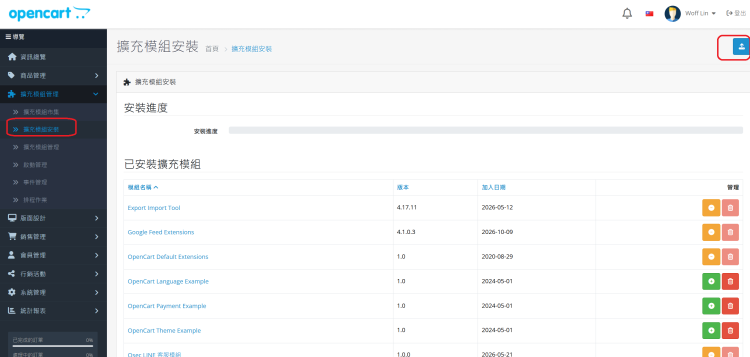
2. 到opencart後台安裝模組
擴充模組安裝上傳
opencart sitemap
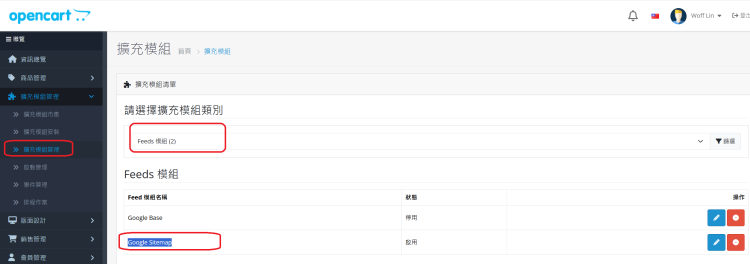
前往 擴充模組管理 -> 擴充模組 (Extensions)。
下拉選擇 Feeds (訂閱/Feed)。
啟用 Google Sitemap。
opencart sitemap
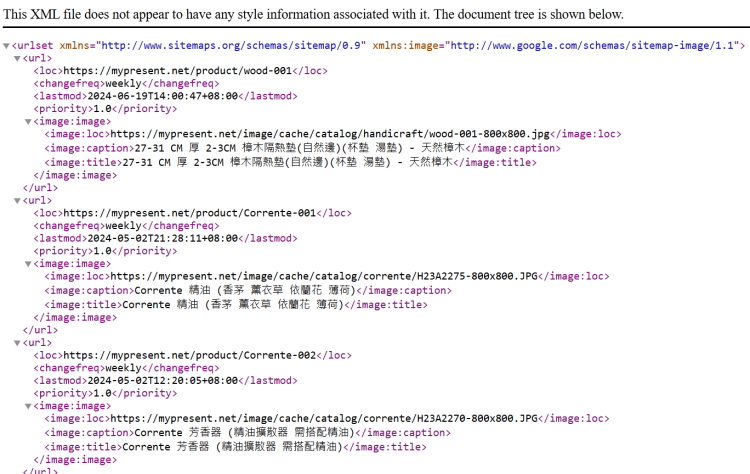
如遇亂碼
TMD 模組 Controller 中的 Content-Type 與輸出邏輯修復請打開該模組控制器 catalog/controller/extension/tmdfeed/feed/google_sitemap.php,查看輸出部分的程式碼。 通常正確的 XML 輸出必須包含正確的 Content-Type 標頭: - // 必須在 setOutput 之前加上這行
- $this->response->addHeader('Content-Type: application/xml; charset=utf-8');
- $this->response->setOutput($output);
2. 在 Google Search Console 中使用了動態網址(帶 ? 號) 直接提交包含 index.php?route=... 的動態網址,有時候會因為 OpenCart 的 URL 重寫機制或 Google 對帶參數網址的快取問題而抓取失敗。 3. robots.txt 未寫入 Sitemap 路徑
Google 爬蟲在抓取 Sitemap 前會先讀取 robots.txt。 修正方法:編輯網站根目錄下的 robots.txt,在最下方加入: - Sitemap: https://mypresent.net/sitemap.xml
opencart sitemap
| 



 IP卡
IP卡
 發表於
發表於  提升卡
提升卡 置頂卡(一天)
 沉默卡
沉默卡 喧囂卡
喧囂卡 變色卡
變色卡 顯身卡
顯身卡