本帖最後由 pipe 於 2026-3-13 19:46 編輯
1. 申請 google 授權碼 (Auth Code)
說明文件
建立用戶端 ID 和用戶端密碼如要建立用戶端 ID 和用戶端密鑰,請建立 Google API 控制台專案、設定 OAuth 用戶端 ID,並註冊 JavaScript 來源: 從專案下拉式選單中選取現有專案,或選取「Create a new project」建立新專案。 注意: 請使用單一專案來保留應用程式的所有平台例項 (Android、iOS、網頁等),每個例項都應有不同的用戶端 ID。在側欄的「API 和服務」下方,選取「憑證」,然後按一下「設定同意畫面」。 選擇電子郵件地址、指定產品名稱,然後按下「儲存」。 在「Credentials」分頁中,選取「Create credentials」下拉式清單,然後選擇「OAuth client ID」。 在「Application type」(應用程式類型) 下方,選取 [Web application] (網頁應用程式)。 註冊應用程式可存取 Google API 的來源,如下所示。來源是指通訊協定、主機名稱和通訊埠的獨特組合。
在隨即顯示的「OAuth 用戶端」對話方塊中,複製用戶端 ID。用戶端 ID 可讓應用程式存取已啟用的 Google API。
google登入 auth
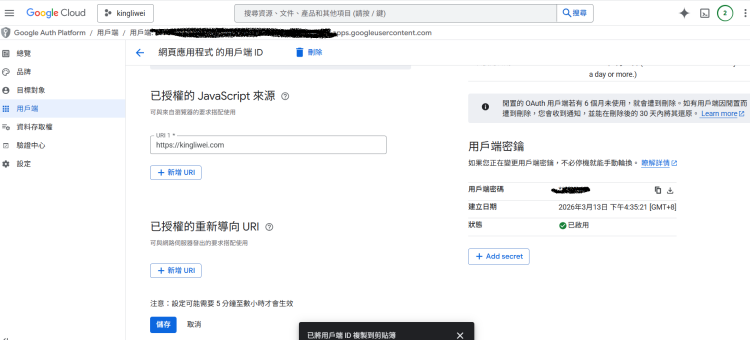
2. 以 https://kingliwei.com 網域為例
建立 login.php
- <?php
- include "global.php";
- session_start();
- // Google API 設定
- $client_id = "your_id.apps.googleusercontent.com";
- if (isset($_POST['credential'])) {
- $id_token = $_POST['credential'];
-
- // 改用 cURL 驗證,比 file_get_contents 更穩定
- $ch = curl_init();
- curl_setopt($ch, CURLOPT_URL, "https://oauth2.googleapis.com/tokeninfo?id_token=" . $id_token);
- curl_setopt($ch, CURLOPT_RETURNTRANSFER, 1);
- curl_setopt($ch, CURLOPT_SSL_VERIFYPEER, false); // 若伺服器 SSL 憑證過舊,此行可避免驗證無效
- $response = curl_exec($ch);
- curl_close($ch);
-
- $user_data = json_decode($response, true);
- if (isset($user_data['email'])) {
- $email = addslashes($user_data['email']);
-
- // 檢查資料庫 (請確保 net_member 資料表有 email 欄位)
- $sql = "SELECT * FROM net_member WHERE email = '$email'";
- $query = $db->query($sql);
- $row = $db->fetch_array($query);
- if ($row) {
- // 登入成功:先設定 Session,最後再執行跳轉
- $_SESSION['username'] = $row['username'];
- $_SESSION['uid'] = $row['uid'];
-
- echo "<script>alert('Google 登入成功!');window.location='index.php';</script>";
- exit;
- } else {
- // 沒帳號,帶到註冊頁
- echo "<script>alert('尚未註冊,請先完成帳號綁定。');window.location='reg.php?email=$email';</script>";
- exit;
- }
- } else {
- echo "<script>alert('Google 驗證無效');history.go(-1);</script>";
- exit;
- }
- }
- $smarty->display('login.htm');
- mysqli_close();
- ?>
3. 建立 login.htm
- <div id="g_id_onload"
- data-client_id="your_id.apps.googleusercontent.com"
- data-callback="handleCredentialResponse"
- data-ux_mode="popup"
- data-auto_prompt="false">
- </div>
- <div class="g_id_signin"
- data-type="standard"
- data-shape="rectangular"
- data-theme="outline"
- data-text="signin_with"
- data-size="large"
- data-logo_alignment="left">
- </div>
- <script src="https://accounts.google.com/gsi/client" async defer></script>
- <script>
- function handleCredentialResponse(response) {
- // 建立一個表單自動提交
- var form = document.createElement('form');
- form.setAttribute('method', 'post');
- form.setAttribute('action', 'login.php');
- var hiddenField = document.createElement('input');
- hiddenField.setAttribute('type', 'hidden');
- hiddenField.setAttribute('name', 'credential'); // 這裡要對應後端的 $_POST['credential']
- hiddenField.setAttribute('value', response.credential);
- form.appendChild(hiddenField);
- document.body.appendChild(form);
- form.submit();
- }
- </script>
展示圖
google登入 auth

| 



 IP卡
IP卡
 發表於 2026-3-13 17:48:12
 提升卡
提升卡 置頂卡(一天)
 沉默卡
沉默卡 喧囂卡
喧囂卡 變色卡
變色卡 顯身卡
顯身卡