1. 安裝 curl
檢查版本
2. 安裝 nodejs 22 and npm 10(NemoClaw 龍蝦最低需求 nodejs 20, npm 10)
列出可用的 Node.js 模組流
啟用並安裝 Node.js 22:
- dnf module enable nodejs:22 -y
- dnf install nodejs -y
安裝npm 10
- curl -o- https://raw.githubusercontent.com/nvm-sh/nvm/v0.39.0/install.sh | bash
- export NVM_DIR="$HOME/.nvm"
- [ -s "$NVM_DIR/nvm.sh" ] && \. "$NVM_DIR/nvm.sh" # This loads nvm
- [ -s "$NVM_DIR/bash_completion" ] && \. "$NVM_DIR/bash_completion" # This loads nvm bash_completion
3. 安裝 python
- dnf install openssl-devel bzip2-devel libffi-devel
- dnf groupinstall "Development Tools"
- gcc --version
- gcc (GCC) 11.5.0 20240719 (Red Hat 11.5.0-11)
4. 安裝 docker
導入Docker官方鏡像來源你就明白100%了,所以我們選擇導入RHEL的來源即可,如下: - dnf config-manager --add-repo https://download.docker.com/linux/rhel/docker-ce.repo
CXT選擇Docker系列元件全部安裝(全部安裝硬碟空間需求也不是多)
- dnf install -y docker-ce docker-ce-cli containerd.io docker-compose-plugin docker-buildx-plugin
啟動Docker,並設定啟動自啟動
- systemctl start docker
- systemctl enable docker
- systemctl status docker
5. 安裝 Nvidia NemoClaw
- curl -fsSL https://www.nvidia.com/nemoclaw.sh | bash
NemoClaw,Docker,python,nodejs,curl,nodejs
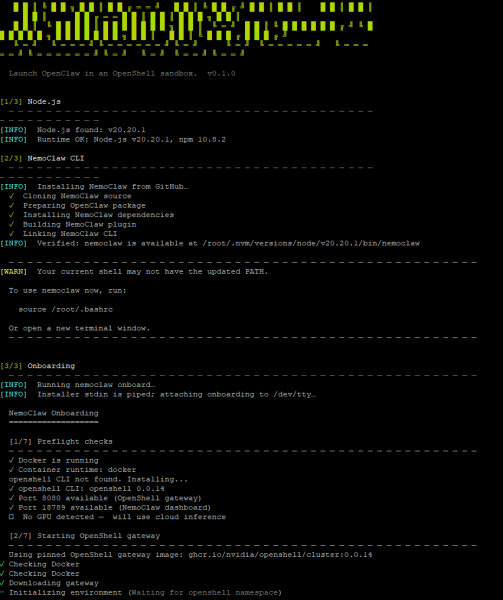
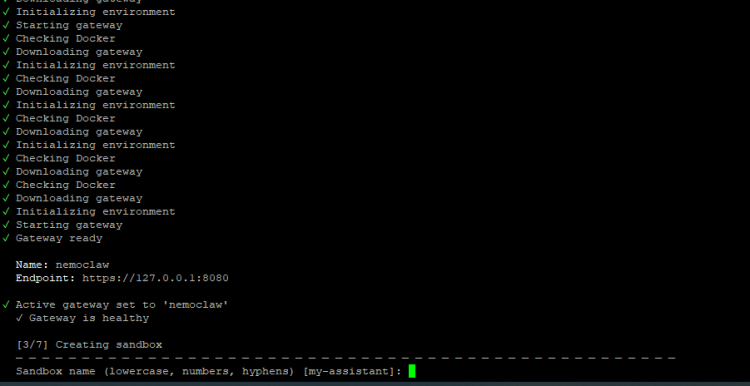
這時會要你輸入助理名稱(龍蝦名稱):如 myclaw
NemoClaw,Docker,python,nodejs,curl,nodejs
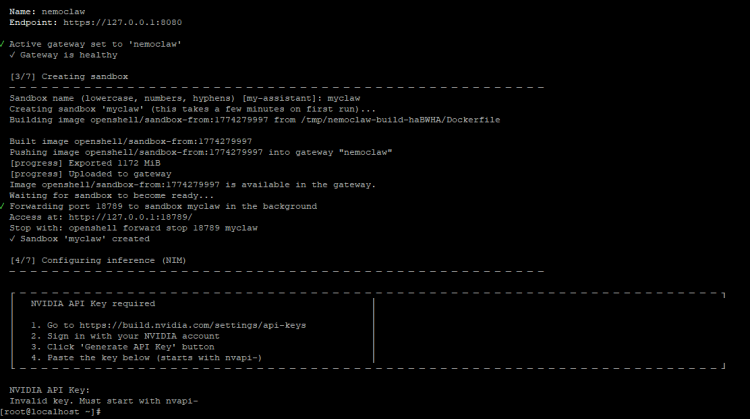
到 https://build.nvidia.com/settings/api-keys 拿取API-KEY並貼上
如果沒輸入API-KEY,指令
就可再次輸入
NemoClaw,Docker,python,nodejs,curl,nodejs
查看指令
Getting Started:
nemoclaw onboard Configure inference endpoint and credentials
nemoclaw setup-spark Set up on DGX Spark (fixes cgroup v2 + Docker)
Sandbox Management:
nemoclaw list List all sandboxes
nemoclaw <name> connect Shell into a running sandbox
nemoclaw <name> status Sandbox health + NIM status
nemoclaw <name> logs [--follow] Stream sandbox logs
nemoclaw <name> destroy Stop NIM + delete sandbox (--yes to skip prompt)
Policy Presets:
nemoclaw <name> policy-add Add a network or filesystem policy preset
nemoclaw <name> policy-list List presets (● = applied)
Deploy:
nemoclaw deploy <instance> Deploy to a Brev VM and start services
Services:
nemoclaw start Start auxiliary services (Telegram, tunnel)
nemoclaw stop Stop all services
nemoclaw status Show sandbox list and service status
Troubleshooting:
nemoclaw debug [--quick] Collect diagnostics for bug reports
nemoclaw debug --output FILE Save diagnostics tarball for GitHub issues
Cleanup:
nemoclaw uninstall [flags] Run uninstall.sh (local first, curl fallback)
Uninstall flags:
--yes Skip the confirmation prompt
--keep-openshell Leave the openshell binary installed
--delete-models Remove NemoClaw-pulled Ollama models
此時NemoClaw 已經安裝完成
連線到龍蝦myclaw
啟動瀏覽器輸入
- http://127.0.0.1:18789/#token=0ecf5f92366c0040ffff94d37aa8569a063b3cb8c61e8a7ec0fb4d9371d61f94
這時他瀏覽器就會秀出畫面
| 



 IP卡
IP卡
 發表於 2026-3-23 22:52:40
 提升卡
提升卡 置頂卡(一天)
 沉默卡
沉默卡 喧囂卡
喧囂卡 變色卡
變色卡 顯身卡
顯身卡